


 Tweet
SUMMARY: In this Valence Developer Diaries session, the CNX Dev team walked through some of the biggest features of Valence 6.4, released June 30th. The tour covered the updated Portal look, a much smarter Valence Assistant, AI-generated app documentation, and a detailed look at the new Data Chat widget in Nitro App Builder (NAB). The team also showed the redesigned App Builder with live previews, the brand-new Valence VS Code extension, and the fully updated Valence guides.
URL: https://youtu.be/ibd-rCaWaJM?si=oChd1de1gbC276B0
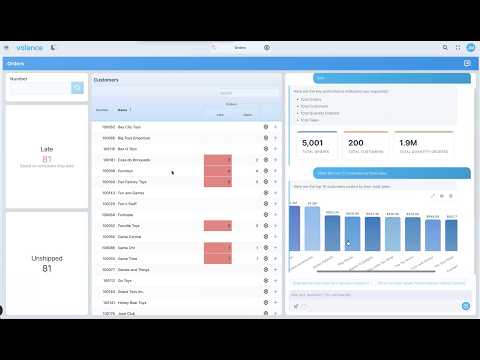
TIMESTAMPS AND FEATURES COVERED:
00:19 - Valence 6.4 overview and what’s covered today
01:18 - New look and theming in the Valence Portal
01:46 - Improved Valence Assistant: creating a data source by chatting
03:27 - Only table metadata is shared with the AI, never your data
04:15 - Q&A: Disabling the assistant in 6.4
04:50 - New app documentation feature: user and technical docs
06:12 - Reviewing the generated user documentation
07:04 - Documentation and the AI disable setting
07:20 - Reviewing the generated technical documentation
08:27 - The new Data Chat widget in the Orders example app
09:42 - Asking for KPIs and follow-up questions
10:15 - Changing chart types and downloading results
10:41 - Data Chat only sees metadata, not table data
11:46 - Clicking a result to navigate to another section
12:26 - Setting up the data source behind the Data Chat
13:36 - Configuring the Data Chat: choosing fields to expose
14:24 - Title, start message, and custom instructions
15:29 - Example: changing behavior with instructions (state codes)
16:13 - Chat options: user instructions, follow-up questions, drill down
17:29 - Guard rails: limiting data by user with a template program
18:46 - AI Access setting: giving the AI access to actual field data
21:01 - Adding tools to the Data Chat (coming in a future episode)
21:35 - Redesigned App Builder layout: app variables, behaviors, theming
22:37 - One save instead of OK, save, and save
23:06 - New slide-out settings and searchable widget properties
24:12 - Live preview: see changes before you save
26:19 - New Valence VS Code extension: setup and connections
27:37 - Browsing data sources, widgets, and apps in VS Code
28:49 - Viewing editable form fields, RPG calls, and app variables
30:10 - Opening widgets and data sources in the NAB editor
31:21 - App Map: structure, flows, and interactions
32:42 - Flows view
33:43 - Extension toolbar: switch, Portal, Fusion, disconnect
34:43 - Assistant usage and extension documentation
35:29 - Test suites: comparing apps across instances
37:19 - Valence Assistant chat in VS Code: NAB agent, agent, plan mode
38:44 - Portal Admin: assistant usage and global instructions
40:01 - Fully updated Valence guides and documentation
41:36 - Q&A: Do test suites use the assistant?
42:15 - Wrap-up and upcoming deep dives
?
URL: https://youtu.be/ibd-rCaWaJM?si=oChd1de1gbC276B0
TIMESTAMPS AND FEATURES COVERED:
00:19 - Valence 6.4 overview and what’s covered today
01:18 - New look and theming in the Valence Portal
01:46 - Improved Valence Assistant: creating a data source by chatting
03:27 - Only table metadata is shared with the AI, never your data
04:15 - Q&A: Disabling the assistant in 6.4
04:50 - New app documentation feature: user and technical docs
06:12 - Reviewing the generated user documentation
07:04 - Documentation and the AI disable setting
07:20 - Reviewing the generated technical documentation
08:27 - The new Data Chat widget in the Orders example app
09:42 - Asking for KPIs and follow-up questions
10:15 - Changing chart types and downloading results
10:41 - Data Chat only sees metadata, not table data
11:46 - Clicking a result to navigate to another section
12:26 - Setting up the data source behind the Data Chat
13:36 - Configuring the Data Chat: choosing fields to expose
14:24 - Title, start message, and custom instructions
15:29 - Example: changing behavior with instructions (state codes)
16:13 - Chat options: user instructions, follow-up questions, drill down
17:29 - Guard rails: limiting data by user with a template program
18:46 - AI Access setting: giving the AI access to actual field data
21:01 - Adding tools to the Data Chat (coming in a future episode)
21:35 - Redesigned App Builder layout: app variables, behaviors, theming
22:37 - One save instead of OK, save, and save
23:06 - New slide-out settings and searchable widget properties
24:12 - Live preview: see changes before you save
26:19 - New Valence VS Code extension: setup and connections
27:37 - Browsing data sources, widgets, and apps in VS Code
28:49 - Viewing editable form fields, RPG calls, and app variables
30:10 - Opening widgets and data sources in the NAB editor
31:21 - App Map: structure, flows, and interactions
32:42 - Flows view
33:43 - Extension toolbar: switch, Portal, Fusion, disconnect
34:43 - Assistant usage and extension documentation
35:29 - Test suites: comparing apps across instances
37:19 - Valence Assistant chat in VS Code: NAB agent, agent, plan mode
38:44 - Portal Admin: assistant usage and global instructions
40:01 - Fully updated Valence guides and documentation
41:36 - Q&A: Do test suites use the assistant?
42:15 - Wrap-up and upcoming deep dives
?